
 // AES-256-GCM · Fully Offline
Your files.
Nobody else's.
Tether is a fully offline, encrypted file vault for Windows and Android. Everything you import is encrypted and stays on your device. No cloud, no accounts, no tracking.
- Windows & Android
- AES-256-GCM
- Open source
- No ads, no tracking
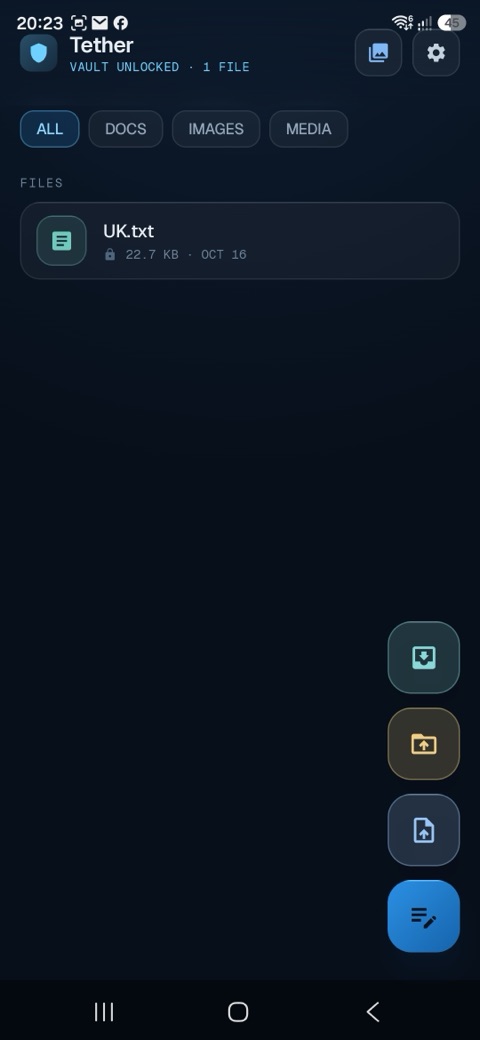
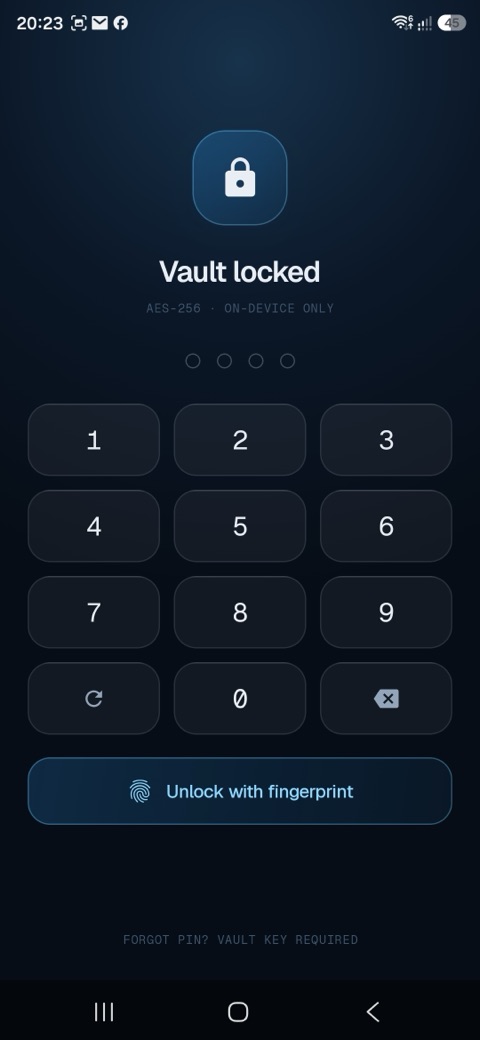
Privacy by design, not by policy
Every technical decision in Tether was made so your files stay yours and never leave your device.
Every file you import is encrypted on your device using AES-256-GCM before it is written to storage. The encryption key is generated on-device and held in the hardware-backed Android Keystore, so it never leaves your phone.
Tether has no user accounts, no cloud sync, and no backend server. Your encrypted files stay in the app's private storage and never leave your device unless you choose to export a copy yourself.
App access is protected by Android's BiometricPrompt API: fingerprint or face unlock. Your encryption keys are stored in Android Keystore and never leave the secure hardware element.
All your files are stored locally and are fully accessible without an internet connection. The app makes no network connections at all except to process the optional Pro purchase through Google Play. Your vault is always with you.
Tether contains no advertising, analytics, or crash-reporting SDKs of any kind, and requests no advertising identifier. There is nothing to track, because nothing is collected.
Need to share a file? Export an unencrypted copy to any location you choose using Android's standard file picker. No third-party involvement. Just your file, your storage.
Encrypted on your device. Always.
The order of operations is the entire security model. Your key never leaves your device.
On first use, Tether protects your vault with a biometric App Lock. The AES-256 encryption key is generated on-device and stored in the hardware-backed Android Keystore, bound to your biometrics.
When you save or import a file, it is immediately encrypted with AES-256-GCM on your device. A unique 96-bit IV is generated per file. The plaintext is never written to disk or sent over the network.
Encrypted files are stored only in the app's private storage on your device. There is no cloud, no account, and no Tether server, so nothing is transmitted off your device.
Your files stay in the vault until you decide otherwise. Use the export feature to save a decrypted copy elsewhere on your device or to share it. That action is always initiated by you, never automatic.
Privacy Policy
This policy applies to the Tether Android application and the kbis.dev/tether website.
Tether is a fully offline, local-only encrypted file vault, available on every platform it is published to. Everything you import is encrypted on your device with AES-256-GCM and stored only in the app's private storage. Tether has no user accounts, no cloud sync, and no backend server. No personal or device data is ever collected, transmitted, or accessible by the developer or any third party.
This policy applies to Tether wherever you downloaded it, and the app behaves identically with respect to your privacy on every platform: the app is fully offline, so nothing ever leaves your device unless you export a copy yourself. Depending on where you installed it, the notes below apply to you:
- Android (from Google Play): no personal data is collected, no ads, and no tracking. Any optional purchase is handled by Google Play Billing.
- Windows (from the Microsoft Store): identical privacy behaviour. Any optional purchase is handled by the Microsoft Store.
- iOS (from the Apple App Store): identical privacy behaviour. Any optional purchase is handled by the Apple App Store.
- macOS (from the Mac App Store): identical privacy behaviour. Any optional purchase is handled by the Apple App Store.
No matter which platform you are on, Tether does not collect, transmit, or sell your personal data.
The developer (Krasimir Borisov / KBIS.dev) does not collect, transmit, or store any of the following:
- The content of your files (encrypted on-device; only you can open them)
- Your name, email address, or any account credentials
- Your device identifiers, IP address, or location
- Any advertising identifier
- Usage analytics, crash reports, or telemetry of any kind
There is no Tether backend server and no account system. The app contains no ads, no analytics, and no crash-reporting SDKs of any kind.
Files you import are encrypted on your device with AES-256-GCM before they are written to storage. The encryption key is held in the Android Keystore, a hardware-backed secure enclave, and never leaves your device. Access to the app is protected by a biometric App Lock (fingerprint or face).
Because the keys never leave your device, your encrypted files can only be opened on that device through the app. There is no cloud copy and no remote recovery.
Tether stores the following data locally on your device only:
- Encrypted file contents in the app's private storage directory (not accessible to other apps)
- File metadata such as filename and size, in a local database
- The AES-256 encryption key in the Android Keystore, protected by your biometrics
All local data is stored in app-private directories and is automatically and permanently deleted when you uninstall Tether. Nothing is backed up to any cloud service.
Your files never leave the vault unless you decide to export them. If you use the app's extract feature to save a decrypted copy of a file elsewhere on your device or to share it, that action is entirely under your control and initiated by you. Tether never transmits your files anywhere on its own.
Tether requests only the minimum permissions needed to function, and uses them for nothing else:
- Biometric unlock (Android USE_BIOMETRIC / USE_FINGERPRINT; Windows Hello; Apple Touch ID or Face ID): to unlock the app with App Lock.
- File and media access (Android READ_MEDIA_IMAGES / VIDEO / AUDIO; the standard file picker on Windows, iOS, and macOS): so you can choose files to import into the vault. Only files you select are ever accessed.
- Network access (Android INTERNET / ACCESS_NETWORK_STATE, and the equivalent on other platforms): used solely to process the optional one-time Tether Pro purchase through the relevant app store. Tether makes no other network connections.
Tether offers a one-time Tether Pro purchase that removes the 50 MB free-tier storage cap. The purchase is processed entirely by the app store you downloaded from: Google Play Billing on Android, the Microsoft Store on Windows, or the Apple App Store on iOS and macOS. The developer never receives or stores your payment card details, billing address, or any financial information; the app only receives a confirmation that the purchase was successful.
Your purchase is subject to the terms of the store you bought it from. Pro status is restored automatically from that store if you reinstall the app.
The only outside parties involved are the app stores that process the optional one-time Tether Pro purchase: Google Play (Android), the Microsoft Store (Windows), and the Apple App Store (iOS and macOS). The developer receives no payment data. Tether contacts no other servers, APIs, or services, and includes no advertising, analytics, or tracking SDKs.
Tether does not knowingly collect any information from or about children under the age of 13. The app requires no account and collects no personal data from any user, including children.
Because Tether holds no personal data about you and stores everything on your device, your data is entirely under your control. You can remove it at any time by deleting files within the app or by uninstalling Tether, which permanently deletes all locally stored data. There is no cloud account or server-side data to access, export, or erase.
If this policy changes materially, the updated version will be published at kbis.dev/tether with a revised "last updated" date. Because we hold no contact information for users, we cannot notify you directly. We recommend bookmarking this page.
Tether has no account and no server-side data, so there is nothing for the developer to delete. To remove everything, delete files within the app or uninstall Tether from your device. Uninstalling permanently removes all locally stored encrypted files and app data. Nothing remains anywhere else.
Questions or concerns about this policy? Contact the developer at kb.interactive.systems@gmail.com or via LinkedIn.
Developer: Krasimir Borisov · KBIS.dev · Solihull, UK
Questions about Tether?
Feature requests, bug reports, or privacy questions, reach out directly. No support ticket system, just a real developer.